
Describe Webhooks
Webhooks are messages ( or payload ) sent from an application after the execution of an operation. They are also used to communicate between a chain of services; for example, a payment provider emits webhook events to an e-commerce application’s endpoint after a payment operation. Collectivis can be used to send webhook events from your application to your clients by serving as a reliable egress.
In this article i will show, we will build a Todo API in Go using the Gin HTTP Router Library and use Collectivis to publish webhook events for each operation on our Todo items; create, update & delete.
Prerequisites
To follow along you would need the following
- A Collectivis Cloud account.
- An Outgoing Project ID & API Key.
For the sake of brevity, we created an additional resource to help with creating user endpoints, usually users will supply this information to you via your dashboard. [2] We have also left out other aspects of the code not necessary for this guide.
API Spec
Our API looks like this:
Endpoint
GET    /endpoints
GET    /endpoints/:id
POST   /endpoint
PUT    /endpoint/:id
DELETE /endpoint/:id
Todo
GET    /todos
GET    /todos/:id
POST   /todos
PUT    /todos/:id
DELETE /todos/:id
Every time we create, update and delete a todo item, we would generate the following events — todo.created, todo.updated, and todo.deleted respectively.
Let’s Build Our API
Project Setup
mkdir convoy-todo-api && cd convoy-todo-api && go mod initEndpoints API
import (
	"net/http"
	"os"

	convoy "github.com/frain-dev/convoy-go"
	"github.com/gin-gonic/gin"
)

type Error struct {
	ErrMsg string `json:"err_msg"`
}

var convoyClient = convoy.New(convoy.Options{
	APIKey:      os.Getenv("CONVOY_API_KEY"),
	APIEndpoint: os.Getenv("CONVOY_API_ENDPOINT"),
	ProjectID:   os.Getenv("CONVOY_PROJECT_ID"),
})

func GetEndpoint(c *gin.Context) {
	endpointID, ok := c.Params.Get("id")
	if !ok {
		c.JSON(http.StatusBadRequest, &Error{ErrMsg: "endpoint id is required"})
		return
	}

	endpoint, err := endpointDB.Find(endpointID)
	if err != nil {
		c.JSON(http.StatusInternalServerError, &Error{ErrMsg: "failed to fetch convoy endpoint"})
		return
	}

	c.JSON(http.StatusOK, endpoint)
}

func AddEndpoint(c *gin.Context) {
	e, err := parseEndpointFromBody(c)
	if err != nil {
		c.JSON(http.StatusBadRequest, &Error{ErrMsg: "failed to read request body"})
		return
	}

	createEndpoint := &convoy.CreateEndpointRequest{
		URL:         e.URL,
		Secret:      e.Secret,
		Description: e.Description,
	}

	resp, err := convoyClient.Endpoints.Create(createEndpoint, nil)
	if err != nil {
		c.JSON(http.StatusInternalServerError, &Error{ErrMsg: "failed to create convoy endpoint"})
		return
	}

	e.ID = resp.UID

	err = endpointDB.Save(e)
	if err != nil {
		c.JSON(http.StatusInternalServerError, &Error{ErrMsg: "failed to save convoy endpoint"})
		return
	}

	c.JSON(http.StatusOK, e)
}

func UpdateEndpoint(c *gin.Context) {
	endpointID, ok := c.Params.Get("id")
	if !ok {
		c.JSON(http.StatusBadRequest, &Error{ErrMsg: "endpoint id is required"})
		return
	}

	update, err := parseEndpointFromBody(c)
	if err != nil {
		c.JSON(http.StatusBadRequest, &Error{ErrMsg: "failed to read request body"})
		return
	}

	updatendpoint := &convoy.CreateEndpointRequest{
		URL:         update.URL,
		Secret:      update.Secret,
		Description: update.Description,
	}

	resp, err := convoyClient.Endpoints.Update(endpointID, updatendpoint, nil)
	if err != nil {
		c.JSON(http.StatusInternalServerError, &Error{ErrMsg: "failed to update convoy endpoint"})
		return
	}

	err = endpointDB.Update(update)
	if err != nil {
		c.JSON(http.StatusInternalServerError, &Error{ErrMsg: "failed to update convoy endpoint"})
		return
	}

	c.JSON(http.StatusOK, e)
}

func DeleteEndpoint(c *gin.Context) {
	endpointID, ok := c.Params.Get("id")
	if !ok {
		c.JSON(http.StatusBadRequest, &Error{ErrMsg: "endpoint id is required"})
		return
	}

	err := convoyClient.Endpoints.Delete(endpointID, nil)
	if err != nil {
		c.JSON(http.StatusInternalServerError, &Error{ErrMsg: "failed to delete convoy endpoint"})
		return
	}

	err = endpointDB.Delete(endpointID)
	if err != nil {
		c.JSON(http.StatusInternalServerError, &Error{ErrMsg: "failed to delete convoy endpoint"})
		return
	}

	c.JSON(http.StatusOK, e)
}
Todos API
import (
	"encoding/json"
	"net/http"

	convoy "github.com/frain-dev/convoy-go"
	"github.com/gin-gonic/gin"
)

type Todo struct {
	Title       string `json:"title"`
	Description string `json:"description"`
}

func GetTodo(c *gin.Context) {
	todoID, ok := c.Params.Get("id")
	if !ok {
		c.JSON(http.StatusBadRequest, &Error{ErrMsg: "todo id is required"})
		return
	}

	todo, err := todoDB.Find(todoID)
	if err != nil {
		c.JSON(http.StatusInternalServerError, &Error{ErrMsg: "failed to fetch todo"})
		return
	}

	c.JSON(http.StatusOK, todo)
}

func CreateTodo(c *gin.Context) {
	todo, err := parseTodoFromBody(c)
	if err != nil {
		c.JSON(http.StatusBadRequest, &Error{ErrMsg: "failed to read request body"})
		return
	}

	err = todoDB.Save(todo)
	if err != nil {
		c.JSON(http.StatusInternalServerError, &Error{ErrMsg: "failed to save todo"})
		return
	}

	err = sendWebhookEvent("todo.created", todo)
	if err != nil {
		c.JSON(http.StatusInternalServerError, &Error{ErrMsg: "failed to send todo.created event"})
		return
	}

	c.JSON(http.StatusOK, e)
}

func UpdateTodo(c *gin.Context) {
	todoID, ok := c.Params.Get("id")
	if !ok {
		c.JSON(http.StatusBadRequest, &Error{ErrMsg: "todo id is required"})
		return
	}

	update, err := parseTodoFromBody(c)
	if err != nil {
		c.JSON(http.StatusBadRequest, &Error{ErrMsg: "failed to read request body"})
		return
	}

	err = todoDB.Update(update)
	if err != nil {
		c.JSON(http.StatusInternalServerError, &Error{ErrMsg: "failed to save todo"})
		return
	}

	err = sendWebhookEvent("todo.updated", todo)
	if err != nil {
		c.JSON(http.StatusInternalServerError, &Error{ErrMsg: "failed to send todo.udpate event"})
		return
	}

	c.JSON(http.StatusOK, e)
}

func DeleteTodo(c *gin.Context) {
	todoID, ok := c.Params.Get("id")
	if !ok {
		c.JSON(http.StatusBadRequest, &Error{ErrMsg: "todo id is required"})
		return
	}

	err := todoDB.Delete(todoID)
	if err != nil {
		c.JSON(http.StatusInternalServerError, &Error{ErrMsg: "failed to delete todo"})
		return
	}

	err = sendWebhookEvent("todo.deleted", todo)
	if err != nil {
		c.JSON(http.StatusInternalServerError, &Error{ErrMsg: "failed to send todo.deleted event"})
		return
	}

	c.JSON(http.StatusOK, e)
}

func sendWebhookEvent(eventType string, todo *Todo) error {
	data, err := json.Marshal(todo)
	if err != nil {
		return err
	}

	r := &convoy.CreateEventRequest{
		EventType: eventType,
		Data:      data,
	}

	resp, err := convoyClient.Events.Create(r, &convoy.EventQueryParam{
		EndpointID: "<your-endpoint-id>",
	})

	return err

}
Publish Webhook Events
It’s time to publish your first webhook!
To begin, we start our app
$ go run main.goSecond, we create an endpoint with the cURL command below:
$ curl --request POST \
	--url "localhost:8000/endpoints" \
	-H "Content-Type: application/json" \
	-d '{
		"user_id": "1",
		"url": "https://webhook.site/f60fa8c4-6f69-4447-bf02-ac5d317aa4ca"
	}'
Finally, we create a Todo item, that in turn generates the webhook item. Let's use the cURL command below:
curl --request POST \
  --url "localhost:8000/todos' \
  -H 'Content-Type: application/json' \
  -d '{
	  "title": "Complete Laravel Guide",
		"date": "2022-11-28",
		"user_id": "1"
	}'
The API returns a successful response:
{
  "id": 4,
  "title": "Complete Go Gin Guide",
  "date": "2022-12-02",
  "user_id": 1,
  "created_at": "2022-12-02T06:16:50.000000Z",
  "updated_at": "2022-12-02T06:16:50.000000Z"
}
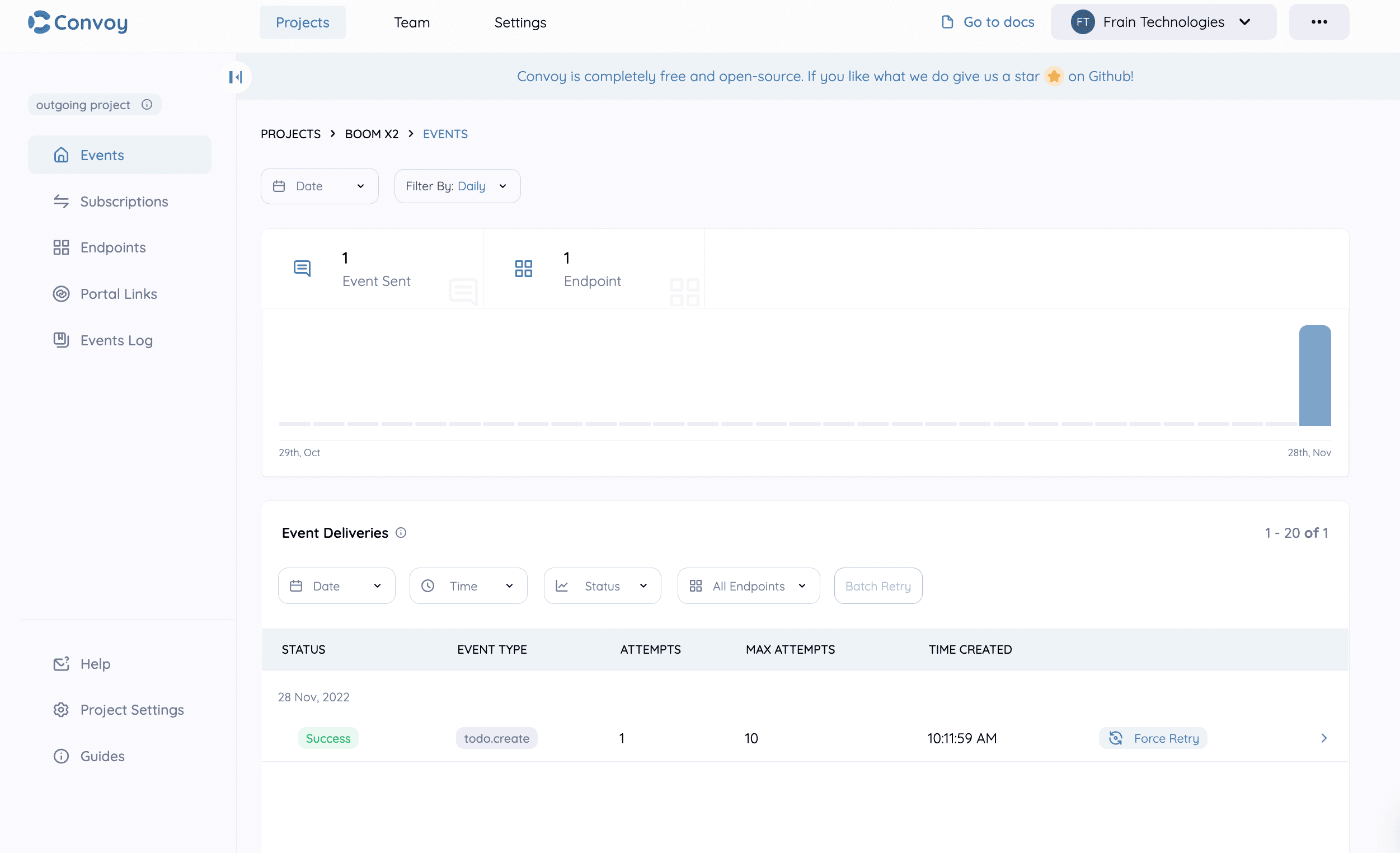
Let’s see our event deliveries dashboard.
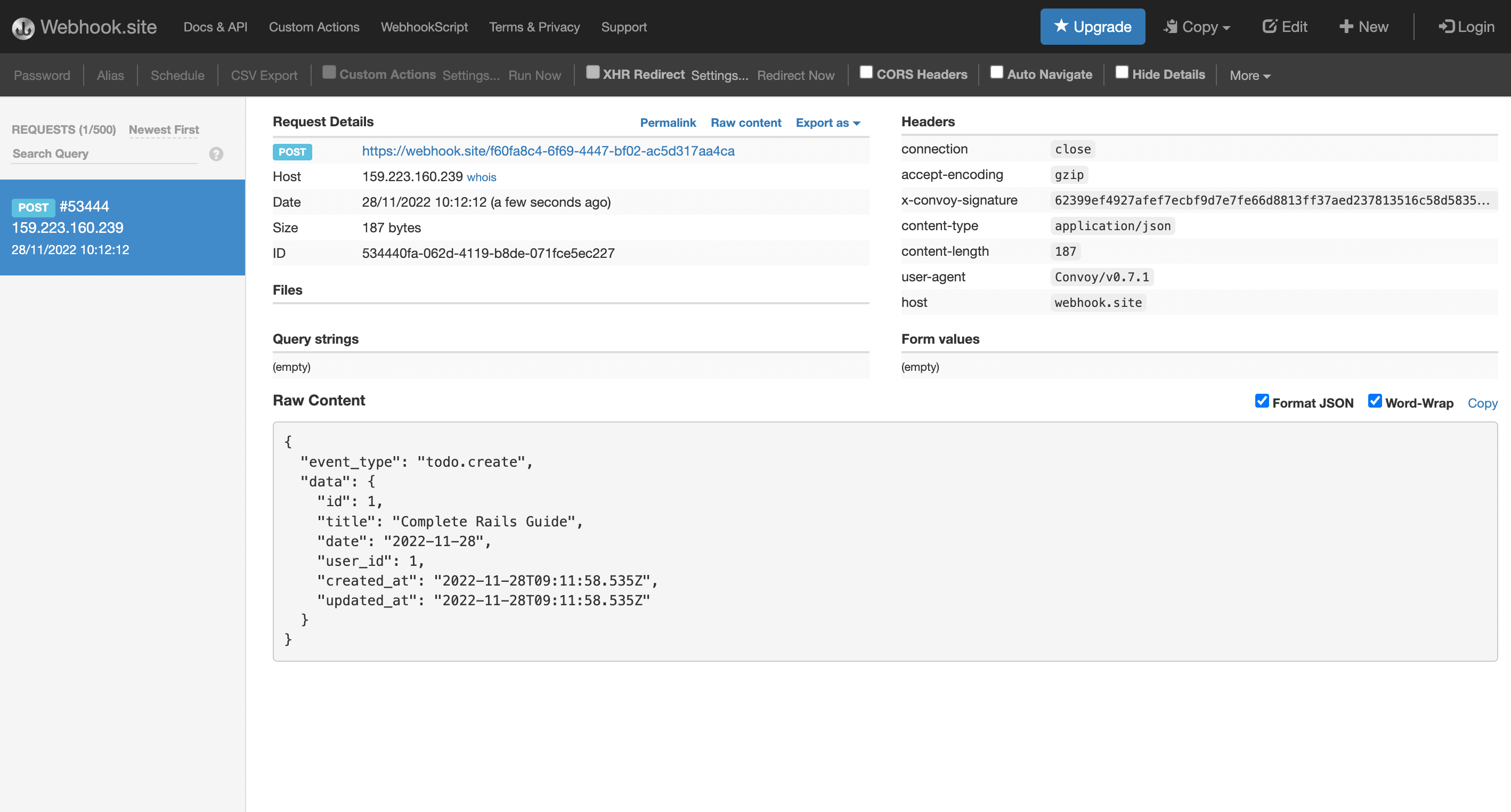
Let’s also see our webhooks endpoint
Appendix
- In production environments, Endpoints should be scoped to each user/business/customer or whatever makes sense in your case because at the point of generating webhooks
- Users can supply their endpoints through multiple means — your dashboard, the portal link
- In this article, we publish webhooks in our controllers, in an ideal production environment, you should publish them from your workers.
Conclusion
Collectivis provides the ability the send webhooks to one endpoint as well as multiple endpoints. In this article, you learned how to send webhooks from a Go Gin API. We hope you enjoyed reading this, and you get to try it out and give us some feedback!